 Adawat
Fancy text for bios and nicknames
Type a name or a short line and copy decorated versions in one tap: Arabic stretching and symbols, and English bold, script, small caps and more.
Your text stays on your device
Everything is generated in your browser. No request is made with your text.
Favorites
Nothing saved yet. Press the heart on a version you like.
Next, try one of these tools
How to use
- 1Type your name or a short bio line.
- 2Browse the decorated versions below.
- 3Press Copy next to the one you like, and heart the ones to keep.
- 4Paste it into your bio, nickname or status.
Common uses
An Instagram or TikTok bio
Put your name between small symbols or in a script alphabet, then copy it into the bio field in one tap.
A gaming nickname
Try the stretched and bracketed Arabic versions or the English small caps for a name that stands out in a lobby.
A status or a shop name in chats
Add a flourish of stars or flowers so the name catches the eye in a long list of contacts.
A set of favorites
Press the heart on versions you like and they stay on this device for the next time you need a nickname.
Tips and limits
- Test the text in the app you will use it in. The same symbol can look different or be missing on another phone.
- Keep the plain name somewhere in your profile, such as the username, so people and search can still find you.
- Avoid long strings of symbols. Some apps count each symbol as several characters and may cut the name short.
- Stretched Arabic looks best on short names; for long names use one stretch per word.
Decorated text for bios and nicknames
Many apps let you change the text of your name or bio but not its font. The usual workaround is decorated text: ordinary Unicode characters that look different, such as a name between stars, in corner brackets, stretched with tatweel, or written in a bold or script alphabet. This page turns whatever you type into dozens of ready versions you can copy with one tap and paste into Instagram, TikTok, X, Snapchat, a gaming nickname or a chat status.
For Arabic, the decorations are made for the language. Tatweel stretches a word between letters that really join, harakat can be added for looks, and symbols such as ★ ✦ ❀ ☾ or the brackets 『 』 and 「 」 frame the name. We never insert invisible characters or direction marks, because many apps strip them and they can break copying and search, so what you copy is plain text. For English, the styles use Unicode letter blocks, so bold, italic, script, double-struck, small caps and circled letters all work without installing a font. Save the ones you like to your favorites on this device. If you want the name itself as an image with a proper calligraphy font, use the Arabic name designer, and the signature maker covers handwriting-style versions.
Decorated text has limits worth knowing. Not every app or phone font can show every symbol, so some characters may appear as empty boxes. Screen readers may read a styled letter by its mathematical name, and search can fail to match it with the plain spelling. A good rule is to keep the main name readable and use the decoration around it. Our guide to Arabic calligraphy styles helps if you would rather pick a lettering style for an image.
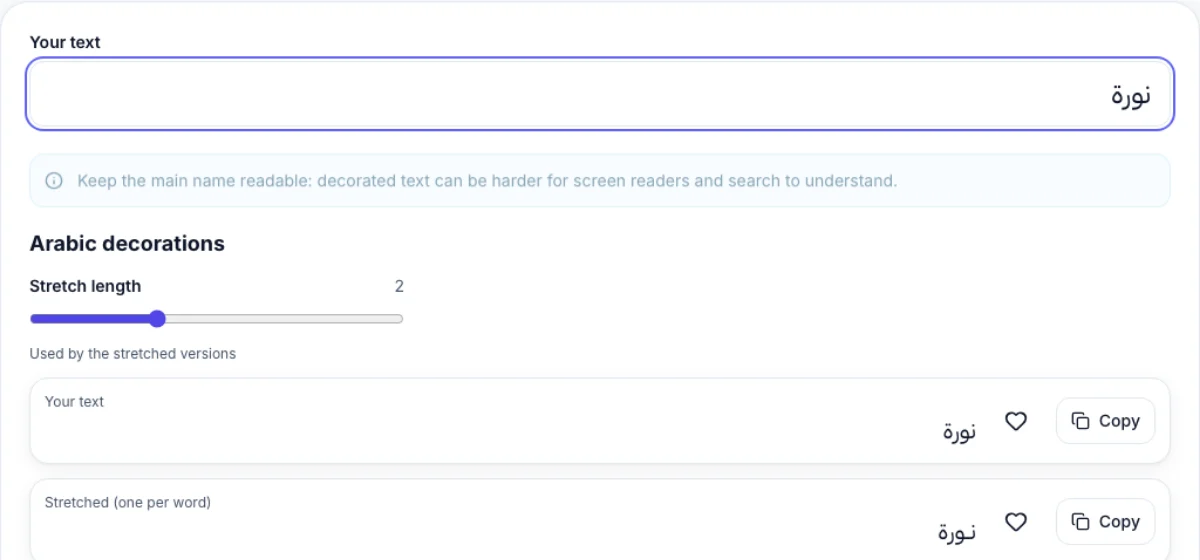
What the list looks like
Step-by-step guides
Frequently asked questions
Why do some symbols show as empty boxes?
The app or phone font does not include that character. Try another decoration from the list, or paste it where you want to use it first.
Is the decorated text a different font?
No. It is ordinary text made of different Unicode characters, so it works anywhere text works, without installing anything.
Does it work in Arabic?
Yes. Arabic names get tatweel, harakat, symbols and brackets. The English styles change only Latin letters and leave Arabic untouched.
Can screen readers read it?
Often not well. A styled letter may be announced by its mathematical name, so keep the main name readable and use decoration around it.
Where are my favorites saved?
In this browser on this device only, using local storage. Clearing site data removes them, and nothing is stored on a server.
Does the tool add hidden characters?
No. We do not add zero-width or direction-control characters, so the copied text is clean and works with search and with the apps that strip invisible characters.