 Adawat
Make a signature from your name
Type your name to see it as a signature in several handwriting styles, tune the slant and underline, or draw it yourself, then download a transparent PNG.
Your signature stays on your device
Signatures are drawn in your browser. The only request is for the font files, which carry no part of your name.
Arabic names use the Arabic signature fonts and Latin names the Latin ones, because a font only has one of the two.
Next, try one of these tools
How to use
- 1Type your name, or open the drawing tab to sign by hand.
- 2Adjust the slant, size, pen color and underline, and choose the style you like.
- 3Download the transparent PNG.
- 4Or press “Use this signature to sign a PDF” to place it on a document.
Common uses
A signature for a PDF form
Type your name, pick a style, then send it to the PDF signer and place it above the signature line.
Signing a letter or certificate design
Download the transparent PNG and drop it on the bottom of a layout in any design app.
Practice before you settle on one
Compare six or more styles for your name, change the slant and underline, and choose the one you can reproduce by hand.
An Arabic signature
Use the Ruqaa or Kufi-based styles for an Arabic name, or draw it yourself in the drawing tab for a more personal look.
Tips and limits
- Use the style you can actually repeat by hand. A signature you can only reproduce on screen will not match your real one.
- A short flourish is enough. Long swashes shrink a lot when the signature is placed on a small signature line.
- Black and blue pens are the two ink colors we offer, because they stay clear on a scan and a photocopy.
- Download at the highest quality and resize it in the document. Scaling a small image up makes the edges soft.
A signature that looks like yours
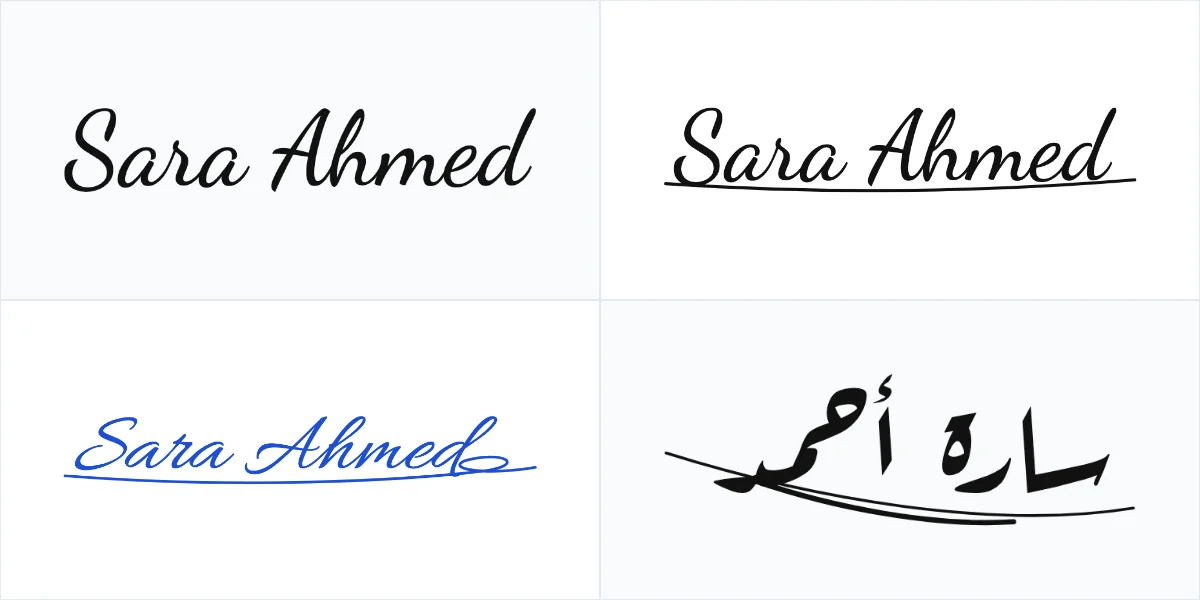
A good signature is quick to write, hard to confuse with anyone else’s and consistent. This tool starts from your typed name and shows it in a set of handwriting fonts, then lets you adjust what makes a signature look personal: the slant, the size, a pen color and a simple underline, swash or loop drawn as a vector stroke. Arabic names use Arabic signature fonts such as Ruqaa and Kufi, and Latin names use script fonts, because a font normally covers only one of the two alphabets.
Prefer your real handwriting? Switch to the drawing tab, sign with a finger or a mouse and download the result. Both ways produce a transparent PNG cropped to the ink, which you can place on a document, a letter, a certificate or a design. The button “Use this signature to sign a PDF” sends the image straight to Sign PDF without saving or sending it anywhere, where you can place it on any page. If the document needs your name in decorative lettering instead, try the Arabic name designer.
Keep expectations realistic. This is a design tool for personal use. A nicer-looking signature does not make a document more valid, and it is not a certified or legally binding electronic signature. Banks, courts and government forms have their own rules, so check what yours requires. Our guide to designing your signature covers what to keep consistent and what the law usually cares about.
Four signature styles for one name
Step-by-step guides
Frequently asked questions
Is this a legally valid signature?
No. It is a decorative design for personal use, not a certified or legally binding electronic signature. Check the rules of the bank, school or authority that asks for the signature.
Why are there fewer styles for my name?
Each font covers either Latin or Arabic letters. We show the fonts that have glyphs for the script you typed, so an Arabic name gets Arabic styles.
How do I sign a PDF with it?
Press “Use this signature to sign a PDF”. The image is handed over in your browser to Sign PDF, where you open a document and place it.
Can I get a transparent background?
Yes. Typed and drawn signatures are both downloaded as a transparent PNG, cropped to the ink, so they sit cleanly on any page color.
Can I draw my own instead?
Yes. Open the drawing tab, sign with a mouse or finger, adjust the pen and download. You can undo the last stroke or clear the pad.
Is my name sent anywhere?
No. The signature is drawn on your device, and the only network request is for font files, which contain none of your text.